Understanding Event Loop & Async Behavior in Node.js

Node.js is known for its speed and efficiency, but the real magic powering it is the Event Loop. Since Node.js runs on a single thread, understanding how the Event Loop manages asynchronous tasks is essential to writing performant applications. In this blog, we’ll explore how the Event Loop works, how async operations are handled, and why Node.js excels at non-blocking I/O.
What is the Event Loop?
The Event Loop is the core mechanism in Node.js that handles asynchronous operations. Although Node.js runs JavaScript in a single thread, it can still perform heavy I/O tasks without blocking the execution, thanks to the Event Loop and the underlying libuv library.
How the Event Loop Works
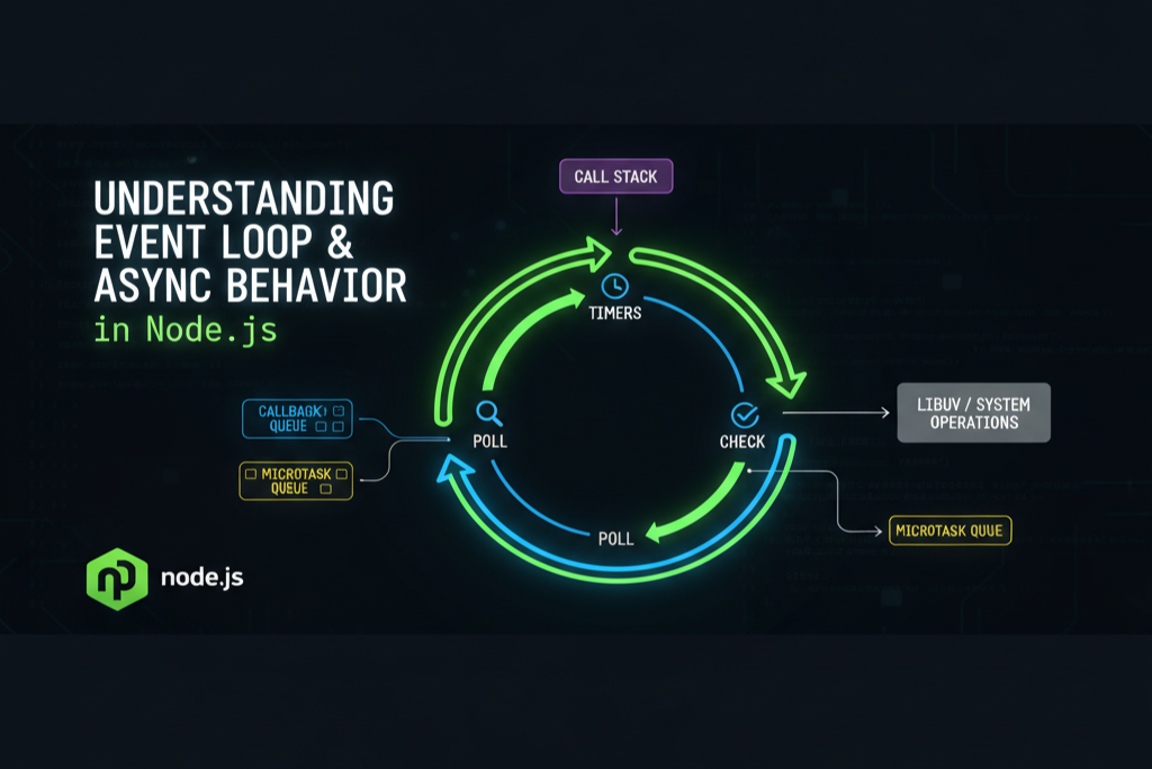
When Node.js receives asynchronous tasks — such as database queries, timers, or network calls — it delegates them to background threads managed by libuv. Once those operations are completed, callbacks are pushed back to the Event Loop for execution.
Phases of the Event Loop
The Event Loop cycles through multiple phases:
- Timers: Executes callbacks from
setTimeoutandsetInterval. - Pending Callbacks: Executes deferred I/O callbacks.
- Idle & Prepare: Internal use only.
- Poll: Retrieves new I/O events and executes I/O callbacks.
- Check: Executes
setImmediatecallbacks. - Close Callbacks: Executes close event callbacks like
socket.on('close').
Async Patterns in Node.js
1. Callbacks
Initially, async operations were handled with callbacks. While this worked, it often led to nested and hard-to-read code, known as callback hell.
2. Promises
Promises introduced a cleaner way to handle async flows using .then() and .catch(), reducing nested callbacks and improving readability.
3. Async/Await
Async/Await builds on top of promises and allows asynchronous code to be written like synchronous code. It’s now the most popular pattern in Node.js.
4. Event Emitters
EventEmitters allow multiple listeners to respond to events, making it ideal for real-time features like chat apps and notifications.
5. Streams
Streams process data in chunks, making them highly efficient for handling large files or continuous data flows.
Best Practices for Working with Async Code
1. Avoid Blocking the Event Loop
CPU-heavy computations should be moved to worker threads. Blocking the Event Loop reduces performance and scalability.
2. Use Promise.all for Parallel Async Tasks
If tasks are independent, run them in parallel to reduce execution time.
3. Always Handle Errors
Use try/catch with async/await or .catch() with promises to prevent crashes.
4. Utilize Performance Tools
Tools like clinic.js, pm2, and Node.js inspector help analyze and optimize performance.
Conclusion
Understanding the Event Loop is essential for mastering Node.js performance. By leveraging async patterns correctly and avoiding blocking operations, you can build scalable, fast, and efficient applications. The better you understand how Node.js handles async tasks, the more powerful your applications will become.